You can still change leverage after opening, but open orders and margin can block it
Raising or lowering leverage on an open position, and what Binance, OKX and Gate each do when open orders or thin margin get in the way, plus what Binance's leverage error codes mean.
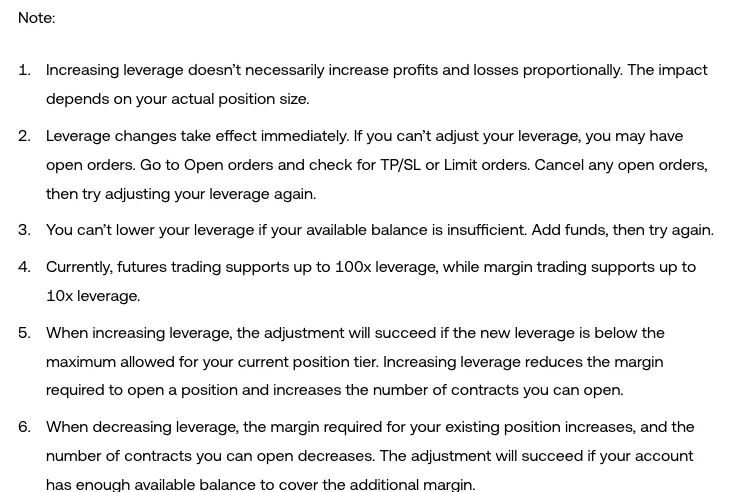
To change leverage on an open position in the OKX app, scroll down to [Positions] on the trading page, tap the [Leverage] icon below the position's trading pair, pick the level and tap [Confirm]. If it won't change, there may be open orders; cancel them, then try again. If your available balance is too low you can't lower it until you add funds. Binance cross positions can go up or down while isolated ones can't be lowered; Gate's help page (August 26, 2021) says leverage can be adjusted freely while a position is open.
1. Changing leverage on an open position: the three exchanges compared
| Situation | Binance USDⓈ-M futures | OKX | Gate |
|---|---|---|---|
| Raise leverage, cross position open | Yes, with the [Adjust Leverage] button | Yes, as long as the new leverage is below the maximum for your current position tier | Yes; Gate's help page (August 26, 2021) says leverage can be adjusted freely before opening or while holding a position |
| Raise leverage, isolated position open | Not covered on the official page | Same as the row above (the page doesn't separate cross and isolated) | Same as the first row (the page doesn't separate cross and isolated) |
| Lower leverage, cross position open | Yes, with the [Adjust Leverage] button | Succeeds only if the account has enough available balance to cover the extra margin | Same as the first row |
| Lower leverage, isolated position open | No; the API returns error code -4161 | Same as the row above | Same as the first row |
| Open orders on the book | Not covered on the official page | May block the change; cancel them, then try again | Not addressed separately |
| Not enough margin or balance | Error code -2028: leverage is smaller than permitted, insufficient margin balance | Can't lower it; add funds, then try again | Not addressed separately |
| When the change takes effect | Not covered on the official page | Immediately | Not addressed separately |
On Binance, a position in cross margin mode can have its leverage raised or lowered with the [Adjust Leverage] button; a position in isolated margin mode can't have its leverage reduced (Leverage and Margin of USDⓈ-M Futures).
The tier OKX refers to when you raise leverage depends on how many contracts you currently hold, and each tier has its own maximum leverage. In the app, position tiers are under [Trade] → the button at the top left → [Market info] → the position tier section. On the web, to change the leverage of an open position, go to [Open positions] on the trading page, select the [Edit] icon next to the leverage of the position's trading pair, choose the level and select [Confirm].
2. What Binance leverage errors -4161 and -2028 mean
When a leverage change through the API is refused, Binance returns one of its USDⓈ-M futures error codes. The codes are fixed but the message text may change, so match on the number. These are the ones that relate to changing leverage:
- -4161: leverage reduction is not supported in isolated margin mode with open positions.
- -2028: leverage is smaller than permitted because of insufficient margin balance.
- -2027: the position exceeds the maximum allowed at the current leverage.
- -4202: going above 20x requires Intermediate Personal Verification.
- -4203: leverage above 20x becomes available one month after account registration.
- -4403: under the Terms of Use and local regulations, leverage in your region is capped, for example at 10x.
For lowering leverage on an open position, the first two matter most: -4161 means an isolated position is open, and -2028 means the margin balance falls short. -4202, -4203 and -4403 block raising leverage, and only come up when you go above 20x or above your region's cap.
3. Why lowering leverage needs more margin
Leverage and margin move in opposite directions. On OKX, lowering leverage increases the margin your existing position needs and reduces the number of contracts you can open, and the change only succeeds if the system finds enough available balance in your account to cover the extra; raising leverage lowers the margin needed to open the position and increases the contracts you can open (How do I adjust leverage levels?). On Binance, initial margin is set by the leverage you choose.
Take a position with a notional value of 1,000 USDT and estimate initial margin roughly as notional ÷ leverage: at 10x that's 1,000 ÷ 10 = 100 USDT, and at 5x it's 1,000 ÷ 5 = 200 USDT, so the extra 100 USDT has to come out of your available balance and into the position. If your available balance can't cover that 100 USDT, that's the insufficient-balance case on OKX where leverage can't be lowered; add funds first, then change the leverage.
4. Before cancelling OKX orders to change leverage, note your TP/SL and available balance
When OKX won't let you change leverage and you suspect open orders are blocking it, go to Open orders and check both TP/SL and Limit orders for anything pending; cancel them, then try again.
If those open orders include this position's take-profit or stop-loss, cancelling them leaves the position unprotected until you place them again. Write down their trigger and order prices before cancelling; OKX applies the change immediately, so as soon as the new leverage is set, put the TP/SL back using the figures you noted, and double-check how to fill them in against Stop-loss & take-profit setup: Binance, OKX, Gate. If what you cancelled was a limit order to open, recheck how many contracts you can open at the new leverage before placing it again.
If you're lowering leverage, check that your available balance can cover the extra margin before cancelling anything, so you don't end up with the orders gone and the leverage still unchanged. To see where the liquidation price ends up afterwards, run the new leverage and margin through the Liquidation price calculator.
When a changed leverage setting actually takes effect
When does OKX's maximum leverage limit take effect?
Only after you adjust your current leverage; until then, orders are placed at the current leverage, meaning the level already set on the order panel. To set the limit on the OKX website, click the [Profile] icon, go to [Security] → [Trading permissions] → [Settings] and select [Max leverage]; perpetual, expiry, margin and auto-borrow leverage can each be set separately, then click [Save].
Does Binance's default leverage setting apply to positions I already hold?
If you already have an open position or order on a symbol, the default leverage setting for that symbol doesn't take effect. To change the leverage on a position that's already open, adjust that position's leverage directly; whether you can depends on the cross and isolated rules.
Why can't I adjust leverage on Binance after verifying my identity?
Adjusting leverage requires completed identity verification, and even after it's complete, the system can take up to 48 hours to sync your data. In some cases the adjustment may fail because verification is still under review or wasn't approved. If you've only just verified, wait out the sync time and try again, and check your verification status in your account.