Binance Sign-Up Guide 2026
In the order you actually hit it — register, verify, lock the account down, then check a few things before money moves
If Binance is already your choice, work straight down this page: get an email address and an ID document ready, register, clear verification, finish the security settings, then move a small amount in and back out. Futures and market calls are out of scope here, and sign-up promotions get rewritten often enough that no bonus figures belong on a page like this.
Still deciding where to open an account? Start with the new-user decision tree instead. If the decision is made, the prep work below is step one.
Once your documents are in reach, this opens the Binance sign-up page with referral code BN68999 carried across by the link itself — there is no code box to fill in on that first screen. Check that your region is served. The code carries a fee discount of up to 20%; whether it applies to you, and at what rate, is decided and displayed by Binance on its own page (checked 2026-09-01). Disclosure: the button here is a referral link to Binance and it carries the code BN68999.
1. Three things to settle before you start
Check that Binance serves where you actually live
What Binance offers, which products are available and which documents count for verification are not the same everywhere. Open the sign-up page and look for your real country of residence in the list. If it isn't there, don't route around it with a VPN, someone else's ID or an invented address. Registration might go through; withdrawals, re-verification and tax paperwork are where the mismatch surfaces, and by then your money is already inside.
Give the exchange its own email address and password
Your exchange password should not be the one guarding your inbox, your social accounts or another exchange. A password manager generating and storing it saves the argument with yourself. Don't park it in a chat window or a notes app that syncs everywhere. Turn on two-factor on the sign-up mailbox too — account recovery almost always runs through that inbox, so it inherits whatever weakness it has.
Have your ID within reach
Verification normally wants a government-issued photo ID; accepted types differ by region, and some regions add proof of address or a liveness check on top. Two minutes now saves a rejected submission later: check the expiry date, and check that the name, date of birth and address you are about to type match the document exactly.
2. Open the sign-up page: one field, one checkbox, one button
Read the address bar before you type anything into the form and confirm the domain really is Binance. Search ads, shortened links dropped in group chats and installer files sent by a helpful stranger calling themselves support are all common ways people land on a convincing copy. Register with an email address or a phone number, whichever you prefer.
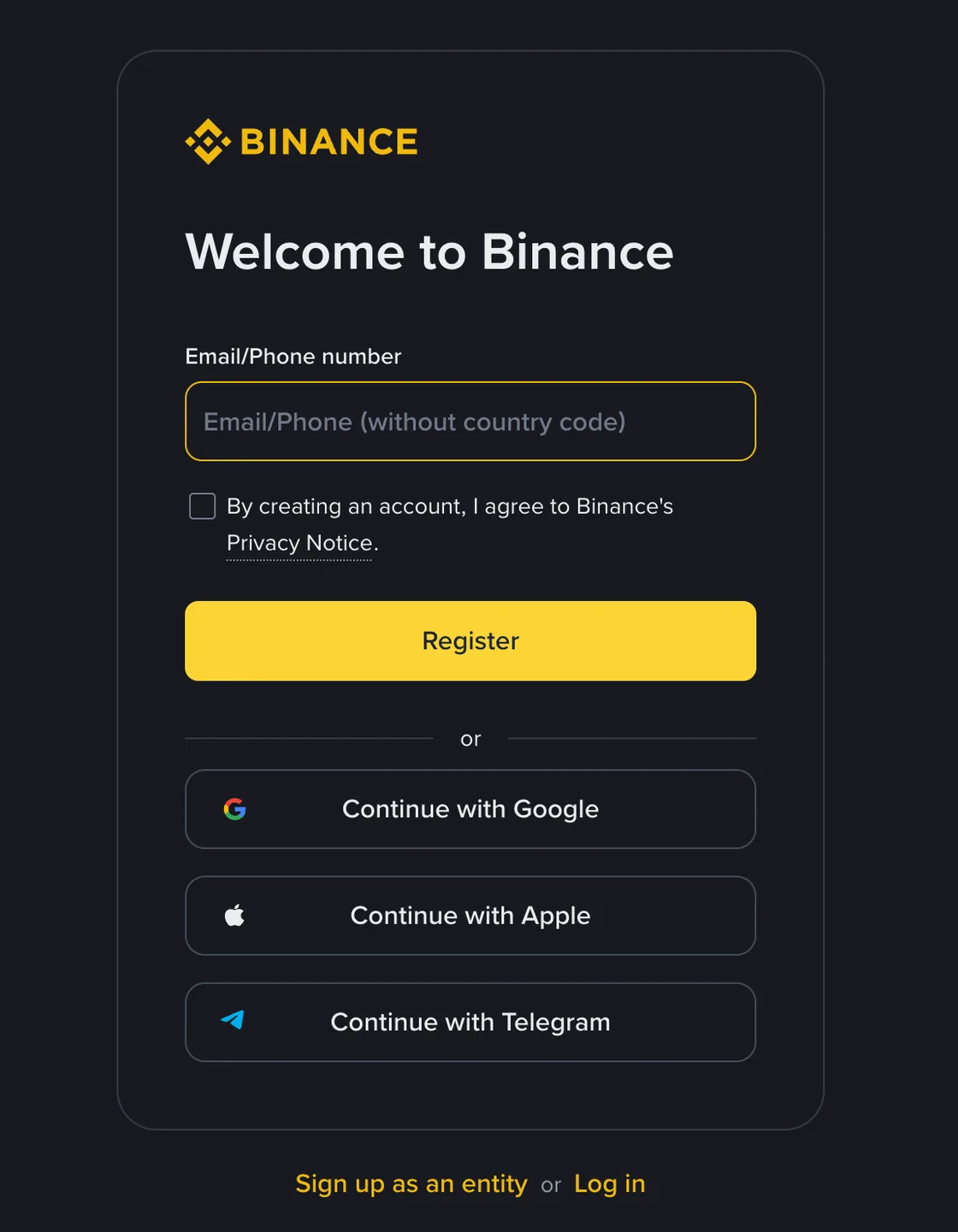
Before you go looking for a code box, know this: there is no referral field on the first screen at all — no dropdown, no I have a code link, no optional box. What you get is one field for your email or phone number, a privacy notice already ticked, a submit button, and three third-party sign-in options. The screenshot below is that screen. The code BN68999 rides in on the link you arrived through, which is why there is nothing to type. If a code box does appear at a later step, go by what that screen shows you at the time. If you reload, or switch between email and phone sign-up halfway through, that row collapses again and the field can come back empty, so check it a second time right before you submit.
A code then arrives by email or SMS. It goes into the Binance page and nowhere else. Anyone asking you to forward that code, install remote-control software or hand over your documents so they can “do the KYC for you” is running a theft, without exception. Official review never involves sending a verification code to a person.
3. Get through verification
On the verification screen, pick your residence and document type honestly. Photograph the document with all four corners inside the frame, avoid glare and shadows, and upload the original file rather than a screenshot or an image a chat app has already compressed. For the face check, find even lighting, take off hats and tinted lenses, and stay on a stable connection. How long the review takes varies by region and by how busy the queue is; the page itself tells you what to expect.
If it comes back rejected, read the stated reason before you touch anything. Re-submitting the same file repeatedly is the one response that never helps.
- Details don't match: check name order, transliteration, date of birth and document number against the document. Cycling through spellings hoping one sticks is how accounts get flagged.
- Photo isn't clear enough: reshoot in daylight. No filters, no retouching, and nothing that has been through a messaging app.
- Document type or region unsupported: stop here and use a platform that is licensed to serve you. There is no clever workaround, only a worse version of the same problem later.
- Account or document already in use: go through official account recovery or the appeals form. Opening a second, third and fourth account makes the eventual review harder.
Passing verification means your identity has been checked. It says nothing about whether your account is hard to break into. Before you deposit, spend ten minutes on the next section.
4. Four settings to finish before you fund the account
- Set up a passkey or an authenticator app. Keep SMS as a backup if you like, but it's a poor choice as the only second factor. When you're done, store the recovery keys or backup codes offline — a printed copy in a drawer beats a screenshot in your camera roll.
- Set an anti-phishing code. Genuine Binance emails then carry the phrase you chose. An email that arrives without it, or with the wrong one, is not from them; don't open the links in it, and don't reply to check.
- Turn on the withdrawal address whitelist. Add the wallet addresses you control. When you add a new one later, note whether the platform imposes a waiting period before it can be used — that delay is the point of the feature.
- Review logged-in devices and API keys. Remove anything you don't recognise or no longer use. An API key is only needed if a tool of yours calls it; if you do create one, grant only the permissions the tool actually requires, and never withdrawal rights on a first key.
If you only do one of these today, make it the authenticator app. I'd rather see someone leave the whitelist for next week than leave SMS as their only second factor — a whitelist limits the damage after someone is already inside, while the second factor is what keeps them out.
5. Make the first deposit a test, not a transfer
Once the account works, resist the urge to move everything at once. Send an amount small enough that fumbling it would be annoying rather than painful, and walk the whole path: deposit, confirm it arrived, buy a little spot, then withdraw it back to your own wallet. Problems with networks, memo tags and address formats show up on that round trip, while the sum at risk is still trivial.
On-chain deposits rarely go wrong because of the coin. They go wrong because of the network. Sending and receiving sides have to be on the same one, and for coins that use a memo or tag, that field is as load-bearing as the address itself. For fiat P2P, keep every message inside the platform's order chat, and never mark a payment as received or release the crypto before the money is actually in your account. The deposit guide covers the individual paths in more detail.
6. Quick check before you call it done
- Your real country of residence is supported on the sign-up page.
- The email address is used for this account only, and the password isn't reused anywhere.
- You arrived through the coded link, so BN68999 rode in with it; there was no code box to fill.
- Verification used your own valid documents, with details matching what you typed.
- Passkey or authenticator, anti-phishing code and withdrawal whitelist are all live before the first deposit.
- The first transfer is a small test, with network, memo or tag and address checked once more before sending.
FAQ
Do I have to complete KYC to use Binance?
In most cases verification is what unlocks the main functions: trading, deposits, withdrawals and P2P. The exact requirements vary by region and change over time, so the official page you see while signing up is the version that counts.
Can I add the referral code after I have registered?
Yes, with conditions: the account must be under 30 days old, have no deposits or trades, have no existing referral relationship, be a main account, not have its ID verification used on another account in the past 180 days, and not be flagged for wash trading. If all of that holds, you can bind a code on the Referral page, and once bound it cannot be changed. So do not treat adding it later as a fallback. There is nothing to expand on the sign-up screen either: the code travels with the link you arrive through, so the thing to get right is arriving through a coded link and not switching browsers or entry points midway. Whether it ends up attached is what the official sign-up page tells you, and nothing else.
Why does KYC fail?
Possible reasons: an expired document, glare or a clipped corner on the photo, sign-up details that do not match the document, poor lighting during the face check, and a region that is not supported. Fix whatever the page flags, and never hand your documents to a third party offering to get you verified.
Is an SMS code enough security on its own?
SMS beats a password alone, but the SIM swap risk is real. Where you can, use a passkey, an authenticator app or a hardware security key, and set an anti-phishing code as well.
How much should I deposit first?
There is no amount that is right for everyone. Make the first one small enough that a mistake would not hurt, and use it to confirm that deposit, trade and withdrawal all work.
Sources and last check
The Binance documentation behind this page was last checked on 2026-09-01. Interface layouts, accepted documents, regional availability and fee promotions all move, sometimes within a quarter. Whatever the official page shows in your region on the day you sign up is the version that applies.